CollectionsAI ChatGPT Connector

Evidence-linked collection decisions. Visible release control.

CollectionsAI brings intake, strict review, and planning into ChatGPT without hiding the human approval step.

Built for the people who carry release responsibility: heads of collections, senior conservators, registrars, and operations leads.

  • Live public app surface
  • Public demo and policy links
  • Human sign-off stays visible
  • Case evidence stays attached

Named pilot references remain private until permissions clear, so the public story has to earn trust with visible proof and explicit release controls.

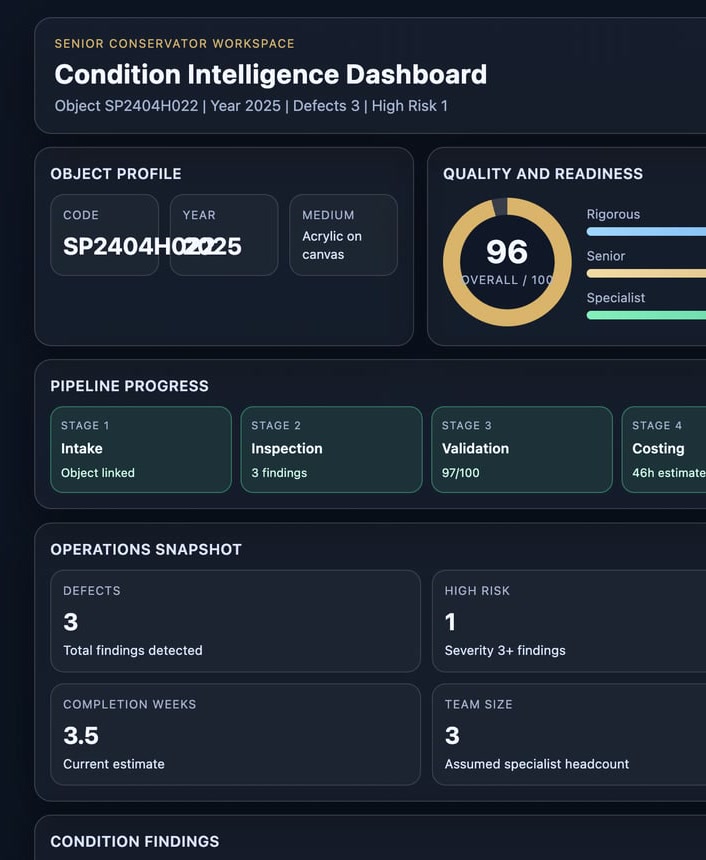
CollectionsAI strict review screen with evidence trace and approval controls
Strict review keeps blockers, evidence trace, and release ownership in the same surface.
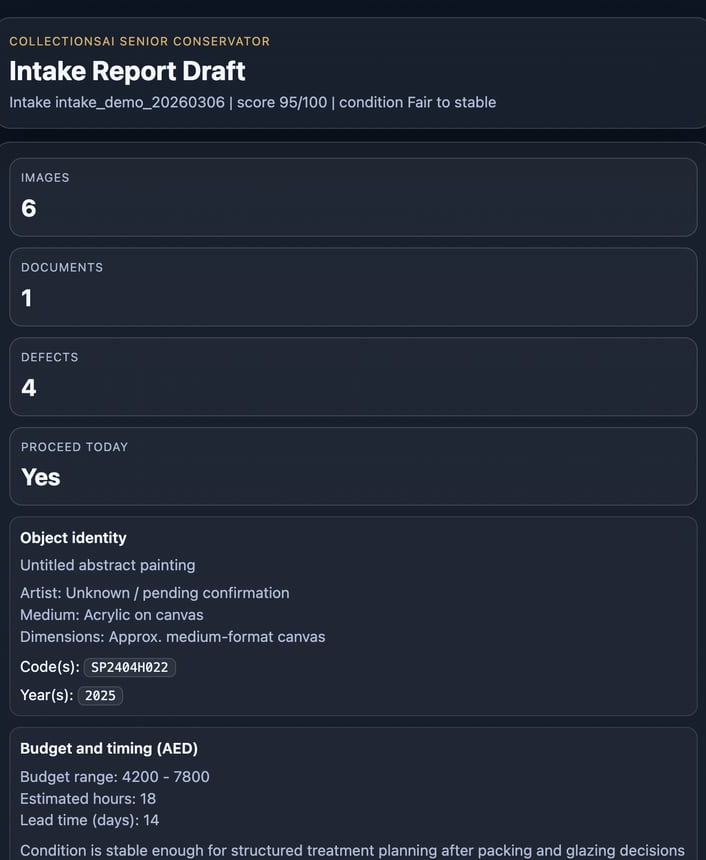
CollectionsAI intake screen for photo-first report creation
Intake begins from the case evidence, not from a blank prompt.
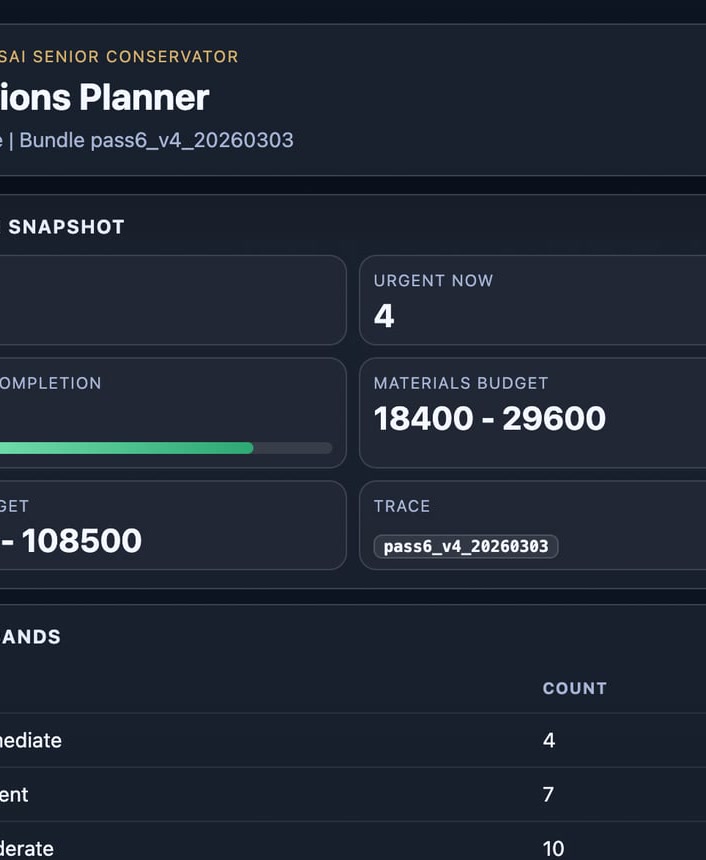
CollectionsAI planning and release screen with staffing and delivery summaries
Planning and delivery stay tied to the reviewed case.

Strict release gate

Draft output is not the release event.

  • Evidence is present before review starts
  • Blocked issues stay visible until cleared
  • A named human owner signs off before release

Inspection theatre

Step into the review room before you open the app.

The landing page now includes one deliberate luxury moment: a dark inspection theatre that makes the release gate legible instead of hiding it inside tiny screenshots.

Move across the stage and the light follows the release gate. The effect is decorative, but the story is operational: the product is built around visible control.

Evidence trace

Case evidence remains attached

Photos, notes, and object context stay connected while the team reviews the case.

Blocked issue

Open questions stay on the surface

Uncertainty is not polished away. The review screen keeps blockers visible until they are cleared.

Release owner

Human sign-off closes the gate

The last state change belongs to a named reviewer, not to a generic assistant response.

CollectionsAI

Senior Conservator

Authoritative decision-grade QA for complex collections.

Evidence-linked Named human owner Release held until clear

Case under review

Acquisition report and condition trace

Hellenistic sculpture, linked notes, and evidence bundle loaded into the review state.

AI confidence

96%

Evidence trace

A+

Critical blocker

Environmental inconsistency

Storage report does not fully match the latest object notes, so release stays blocked.

Procedural blocker

Risk precedent

Material-cost precedent must be confirmed before planning can be treated as release-safe.

Evidence and audit trace

Linked condition report, source photos, acquisition log, climate note, and human review note remain attached.

Human sign-off framing

Pending human decision. The release state does not change until a named reviewer clears the blockers.

Large-format review view with live HTML copy so the release logic stays readable and accessible.

Trusted by

The people who carry release responsibility

Until named references can be published, the trust story has to stay honest: role fit, policy clarity, visible control, and one public product path.

Heads of collections

Need faster case movement without letting release ownership disappear into a generic AI reply.

Senior conservators

Need evidence-linked drafts, visible blockers, and a human release owner before anything leaves the workflow.

Registrars and collection managers

Need one place to connect intake, report questions, planning, and release-safe outputs.

Art logistics and operations leads

Need planning answers that stay tied to the case evidence instead of breaking into separate spreadsheets and chats.

Policy and handling

Sensitive files do not live on the public page.

Public pages expose product and policy information only. Protected artifacts remain outside the public surface.

  • Support, privacy, and terms stay visible
  • Protected artifacts stay off public pages
  • Only task-relevant evidence should be shared

Availability

One public product path is already live.

Visitors can inspect the ChatGPT app page, the live demo, and the public policy surface without entering a gated sales funnel.

  • Public app path
  • Live demo path
  • Public policy links

Rollout model

Guided rollout stays support-led.

Institutions that need rollout review use the support path instead of a second competing CTA funnel on the landing page.

  • One dominant public CTA
  • Support-led rollout review
  • No conflicting pilot funnel in the hero

Why teams choose it

The connector wins on control, not hype.

The strongest difference is structural: evidence-first intake, visible uncertainty, human release control, and operational follow-through in one workspace.

01

Release gate is built in

Uncertainty, blockers, and ownership stay on screen until a human reviewer clears the case.

  • Draft status stays separate from release status
  • Blocked issues do not disappear into fluent copy
  • Human sign-off is part of the flow

02

Evidence stays attached

Photos, notes, and object context remain attached as the case moves from intake to review and planning.

  • No blank-thread starting point
  • Traceable rationale for review decisions
  • Planning follows the reviewed case

03

One workspace for the decision path

The same ChatGPT surface handles intake, review, staffing questions, and delivery preparation.

  • Less copy-paste between tools
  • Fewer spreadsheet handoffs
  • Shorter path from case to action

Strict review gate

No release-ready output without visible checks

A case only moves when the evidence is present, blockers remain visible, quality is high enough, and a named human owner clears release.

  1. Gate 01

    Collect the case evidence

    Bring the photos, notes, and object context into the thread before the case earns decision-grade confidence.

  2. Gate 02

    Keep uncertainty on the surface

    Missing context, unresolved risk, and low-confidence findings remain explicit instead of getting buried in polished output.

  3. Gate 03

    Hold quality before release

    The case must clear the current quality threshold and produce a traceable rationale, not only a fluent answer.

  4. Gate 04

    Require named sign-off

    CollectionsAI supports the decision, but the release state does not change without a named reviewer.

Workflow

Three stages. One continuous case context.

The page stays short because the model is simple: gather evidence, review against the gate, then turn cleared cases into real work.

01

Gather evidence

Bring photos, notes, report bundles, and object context into ChatGPT so the case starts from the real evidence set.

Photos and notes Object context No blank chat

02

Review against the gate

Surface findings, open questions, and release blockers before any output can read as final.

Blocked issues Confidence trace Human review

03

Turn cleared cases into work

Use the same workspace to answer planning, staffing, and owner-facing delivery questions without breaking case context.

Staffing Materials Client-safe output

Comparison

From uncertain answers to auditable action

Generic copilots can be helpful. This connector is built for the stricter moment when a team has to defend the release decision, not only generate a draft.

Decision factor
Generic AI copilot
CollectionsAI Connector

Starting point

Starts from a prompt and hopes the right case context is already in the thread.

Starts from the evidence set, notes, and case structure before the decision workflow begins.

What happens to uncertainty

Can sound finished even when missing evidence or unresolved risk remain.

Keeps blockers, confidence, and evidence trace visible so uncertainty stays actionable.

Release control

Usually leaves approval and release state outside the workflow.

Requires a visible review gate and a human release owner before output is treated as release-ready.

Operational follow-through

Often stops at summarization and pushes planning into separate documents or spreadsheets.

Continues into staffing, materials, delivery, and artifact routing without breaking case context.

FAQ

Answers before the final CTA

Does this replace a conservator?

No. The connector supports decision-making, drafting, and planning. Final treatment or release decisions still belong to a qualified human reviewer.

What is already public today?

As of March 7, 2026, the public surface includes the ChatGPT app page, the live demo, support, privacy, and terms. The landing page also reflects the current connected-tool and burst-check posture already validated in the live app work.

Why is there no named customer logo wall yet?

Named pilot references are not shown publicly until permissions are cleared. This page uses dated verification and role-based fit instead of invented endorsements.

What does a rollout review need to get started?

One sample report bundle or photo set, one operator or review owner, and a clear release workflow. The goal is to prove intake, QA, and planning fit before broader rollout.

How are sensitive files handled?

Public pages stay separate from protected artifacts. Operators should share only the evidence required for the active conservation task, and client-facing outputs avoid unnecessary path exposure.

How does this fit existing collection systems?

The current public path centers the ChatGPT workflow itself. Collection-management and system-of-record integration are evaluated during support-led rollout reviews so the workflow can be mapped to the institution's real handoff points instead of being promised generically on the public page.

What is the access model?

The public ChatGPT app page is the main path. Institutions that need rollout review or scoped onboarding use the support path, keeping the landing page focused on one live product route.

One public path

Open the public ChatGPT app. Use support only when your institution needs rollout review.

The public app page is the main path. Support is the only secondary route, which keeps the landing story clear while still leaving room for scoped rollout conversations.

Public app

Main product path

Open the ChatGPT app page to inspect the live public surface first.

Support

Guided rollout review

Use support when your institution needs a scoped rollout or release-workflow review.

Policies

Public trust links

Support, privacy, and terms remain visible from the landing page and the public app surface.